
.jpg)

.avif)


“Which AI tool can do this for me?” is the question most agency recruiters start with, and it's the wrong one.
AI recruitment software isn't one product category. It's a dozen different types of tools solving different parts of the hiring workflow, and most agencies end up running several of them together rather than picking one.
The better starting question is which specific bottleneck to fix first: sourcing, screening, scheduling, note-taking, or something else. This guide breaks AI recruitment software into the eight different categories agency recruiters actually use, with real examples of each, so you can figure out where to start rather than trying to evaluate the entire market at once.
The stakes for getting this right are getting more important by the day. Teams that have made AI a genuine part of their hiring process are 3.8 times more likely to rate their recruiter–hiring manager relationship as excellent, and 79% of those teams exceed their hiring goals.
This guide is deliberately neutral and category-first: the goal is to help you work out which type of tool solves your actual bottleneck, not to make the case for any one buying strategy. If you're already leaning toward consolidating onto a single integrated platform rather than stacking several point solutions from different vendors, we've made that specific case elsewhere.
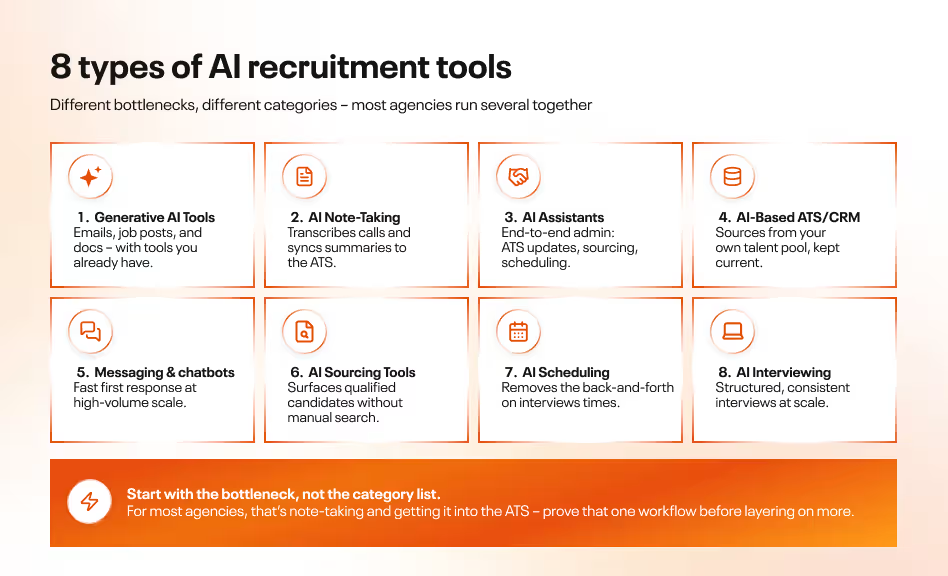
1. Generative AI Tools
General-purpose generative AI (ChatGPT, Gemini, Claude) handles writing client and candidate emails, job descriptions, and social posts, and extracting information from contracts and policy documentation. None of these are recruitment-specific, which is exactly their appeal: agencies already using one for other work can put it to use on the writing-heavy parts of recruiting without buying anything new.
2. AI Note-Taking Tools
Note-taking tools transcribe interviews and calls and turn them into summaries and action items. Beyond the obvious time savings, the real value is letting recruiters actively listen during a candidate conversation instead of splitting attention between the call and a notepad, while the tool handles documentation and syncs it to the ATS automatically. Examples include Carv, Metaview, Fireflies, Otter, and Notta.
3. AI Assistants
AI assistants go further than note-taking – they take over repetitive admin end-to-end: updating the ATS, drafting documents, preparing interview questions from an intake call, generating onboarding paperwork, sourcing qualified candidates, and matching applicants to open roles, often across video, in-person, and phone interactions. Carv is an example built specifically for this, with template and employer-brand customization included.
A quick note on where this category is heading, because it changes what "assistant" means. Most assistants today work the way the label suggests: they prepare something, and a recruiter approves it. A smaller group of tools is starting to finish whole stages on their own, like screening a batch of applicants or booking the interviews, and only hand a case back to a person when it's unusual. Some people call this autonomous recruitment. The label matters less than the question underneath it: at each step, does a person approve the work, or review it afterward? Neither answer is wrong. High-volume teams tend to feel the difference first, because approving every step is what caps how many candidates one recruiter can handle. If you're comparing assistants, ask where each tool sits on that line.
One important boundary worth stating plainly: these tools support the hiring process, they don't replace human judgment in it. Under the EU AI Act, recruitment AI is classified as a high-risk use case, which means real compliance obligations – meaningful human oversight of AI-assisted decisions, documented conformity assessments, and clear disclosure to candidates that AI is involved – not a ban on using AI in hiring. See the FAQ below for more detail.
For a closer look at how AI recruiting assistants specifically work, and why they're increasingly taking on work that used to require several separate tools, see our dedicated breakdown of AI recruiting assistants.
4. AI-Based ATS or CRM
AI-based applicant tracking and CRM platforms handle sourcing from talent pools already in your database and keeping records current. Some rely on external AI agents connected via API for broader reach; others build AI natively into the platform, which is faster to set up but limited to whatever data already lives in that ATS. Examples: Greenhouse, JobAdder, Lever, Manatal, Avature, Beamery.
5. AI Messaging Tools & Chatbots
Messaging tools and chatbots handle initial candidate screening, sourcing, and ongoing engagement – especially valuable for high-volume roles where speed of first response matters more than a human touch at that exact stage. A widely cited case study from Alorica found a chatbot saved 1,200 hours of recruiter time over three months. Examples: Carv, Paradox, Humanly.io. For a closer look at chatbot use cases and the different types in use today, see our breakdown of AI recruitment chatbots.
6. AI Sourcing Tools
Sourcing tools scan candidate profiles and databases to surface qualified people without a recruiter manually searching for them – used for candidate sourcing, job matching, and both candidate and client outreach. Examples: LinkedIn Recruiter, HireEZ, SeekOut, Entelo, Loxo, Manatal (which layers AI-powered recommendations on top of its ATS/CRM functionality), and PeopleGPT by Juicebox.
7. AI-Powered Scheduling Tools
Scheduling tools remove the back-and-forth of coordinating client meetings and candidate interviews across calendars and time zones. Examples: Calendly, Google Appointment Scheduler, GoodTime, Lever, and Greenhouse.
8. AI Interviewing Tools
This category covers structured, AI-assisted interviewing itself, and it spans a wider range of approaches than the other categories: avatar-based interviews (Tengai runs candidates through a structured conversation with an on-screen avatar, aimed at reducing interviewer bias by asking every candidate the same questions the same way), asynchronous screening where candidates record responses on their own time for later review (Willo), and enterprise interview management platforms like VidCruiter, which combines AI-generated structured interview guides, automatic scoring against predefined competency rubrics, real-time note-taking and transcripts, and fraud detection to catch impersonation or unauthorized assistance during interviews.
Between them, these tools cover the full range from lightweight async screening to full enterprise interview infrastructure, and the common thread across all of them is reducing interviewer-to-interviewer inconsistency and building a more defensible, data-backed record of how each hiring decision was made.
Where to start
Start with the task that eats the most of a recruiter's week, and get it running properly before you add anything else. For most agencies that's meeting notes and ATS updates, because it's pure admin and easy to check. Pick something that writes straight into your ATS, so nobody is re-entering anything by hand.
Then watch what changes. Once one step runs reliably, the useful question stops being "which tool helps with this?" and becomes "which steps can I stop approving one by one?" Screening and scheduling usually come next, because the rules are clear and that's where volume swallows a recruiter's day. That order works because each step earns your trust before the next one gets more responsibility.
It's also why we built Carv as separate agents, each owning one stage, from candidate conversations to screening and sourcing. You can switch on one at a time, see what it does on real applicants, and decide how much to hand over. If you want to see what that first stage looks like when it runs on its own, that's the place to begin.
.avif)
.avif)
